
Jnes (NES Emulator)1.4.12.61 - Get APK
You'll be able to download in few seconds.
Publisher Description
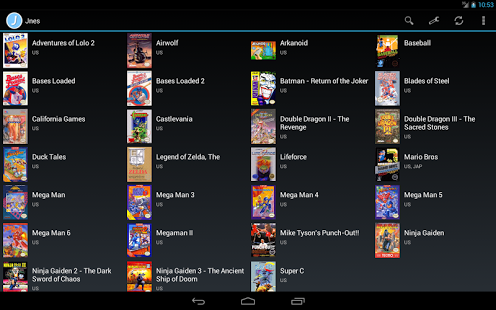
Jnes is a NES emulator that brings the console experience to your Android phone or tablet. It is a port of the popular Jnes for Windows emulator by the same author, developed over many years, containing a high quality NES emulation core and many features for a great Nintendo experience.
• User interface designed for phones and tablets (portrait or landscape mode)
• Game browser with cover art
• Synchronize saved game progress with Dropbox cloud storage
• Fast emulation with OpenGL hardware acceleration
• Game Genie cheats included
• Virtual touchscreen gamepad
• Hardware input devices such as the Sony Xperia, nVidia Shield, MOGA, Red Samurai, iCade 8-bitty, USB gamepads (1 or 2 players)
• Bluetooth network multiplayer (Android 4.0 and higher)
• Save progress with instant save states and multiple slots
• NES NTSC (US, Japan) and PAL (Europe) region support
• Advanced graphics scaling using pixel shaders
• Fast forward 2x playback
• Stereo Sound
• Touch screen zapper (Player 2 option)
• Compressed ZIP and NES file support
• Available in English and Spanish languages
Important Support Information:
• MOGA Pro, Hero, and Pocket Gamepads are supported
• USB gamepads are not supported by Android 4.4 (KitKat)
• Dropbox synchronization is only for game progress not the actual game files
Nintendo games are NOT included with Jnes, place game files on device storage for Jnes to find them. Visit jabosoft.com to learn more or try out the free windows version.
About Jnes (NES Emulator)
The company that develops Jnes (NES Emulator) is Jabosoft. The latest version released by its developer is 1.4.12.61.
To install Jnes (NES Emulator) on your Android device, just click the green Continue To App button above to start the installation process. The app is listed on our website since 2014-10-29 and was downloaded 0 times. We have already checked if the download link is safe, however for your own protection we recommend that you scan the downloaded app with your antivirus. Your antivirus may detect the Jnes (NES Emulator) as malware as malware if the download link to com.jabosoft.jnes is broken.
How to install Jnes (NES Emulator) on your Android device:
- Click on the Continue To App button on our website. This will redirect you to Google Play.
- Once the Jnes (NES Emulator) is shown in the Google Play listing of your Android device, you can start its download and installation. Tap on the Install button located below the search bar and to the right of the app icon.
- A pop-up window with the permissions required by Jnes (NES Emulator) will be shown. Click on Accept to continue the process.
- Jnes (NES Emulator) will be downloaded onto your device, displaying a progress. Once the download completes, the installation will start and you'll get a notification after the installation is finished.
Program Details
System requirements
Download information
Pricing
Version History
version 1.4.12.61
posted on 2014-10-29
version 1.3.1.23
posted on 2013-06-29
Several fixes and updates
Disclaimer
External Download
We do not host Jnes (NES Emulator) on our servers. We did not scan it for viruses, adware, spyware or other type of malware. This app is hosted by Galad and passed their terms and conditions to be listed there. We recommend caution when installing it.
The APK Download link for Jnes (NES Emulator) is provided to you by apps112.com without any warranties, representations or guarantees of any kind, so access it at your own risk.
If you have questions regarding this particular app contact the publisher directly. For questions about the functionalities of apps112.com contact us.
